How to Audit Passwords

If one member of your team uses a weak password, it exposes your entire network to threats. Likewise, if one member of your team reuses their strong password elsewhere and it is pwned, then your entire network is exposed.
Passwords have become the main point of entry for hackers. Any password complex enough to garner security cannot be remembered easily, and with an ever-increasing number of passwords being needed, users often reuse them, which is a huge security risk.
Between weak and reused passwords, your network is far less secure than it would be by design. The first step in rectifying this situation is to audit passwords on your network.
Table of Contents
What is a Password Audit?
A password audit is a systematic review of the passwords used within your network to identify security weaknesses. By leveraging specialized software, the audit simulates various attack methods—such as dictionary attacks, brute force attacks, and AI-assisted cracking—similar to those employed by modern hackers.
The purpose of a password audit is to pinpoint vulnerabilities like weak or compromised passwords, reused credentials, and other security gaps. The software scans for these issues by attempting to break into your network, mimicking the techniques that malicious actors might use. By identifying and addressing these weaknesses, you can significantly enhance your network’s security and protect sensitive data from unauthorized access.
Why Audit Passwords?
The fact is that traditional passwords are deeply flawed: they need to be unique for each site, you need to remember them, and you shouldn’t store them somewhere unsafe like a post-it note or an Excel file. Human nature often runs counter to the aim of secure passwords.
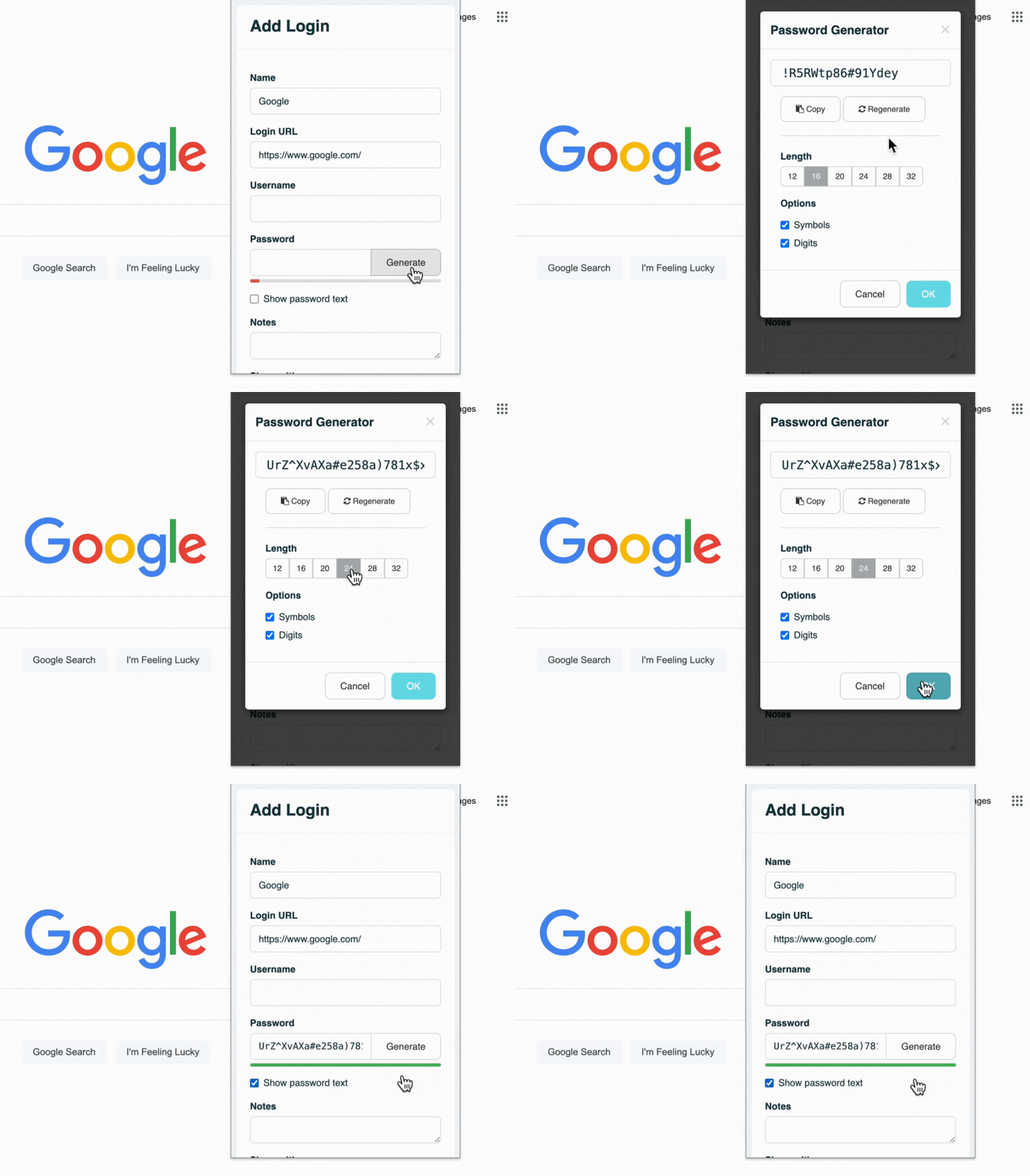
Use a password generator to test the strength of your password
Of course, a strong password manager helps, but before you get the most out of the added security and convenience of a password manager, you need to be confident that the passwords currently accessing your network are secure.
In the past, IT departments enforced strict password complexity to maximize security—requiring a mix of uppercase, lowercase, numbers, and special characters. However, the National Institute of Standards and Technology (NIST) Special Publication 800-63B guidelines now advise against forcing these complex character rules. Studies show that forcing special characters just makes users create predictable passwords (like Password123!). NIST now recommends focusing on length (using passphrases of 15+ characters) rather than a confusing mix of characters.
Even if a user chooses a compliant password, is it safe from modern hacking? Historically, we worried about brute force attacks (trying every combination from "aaaaa" to "zzzzz") and dictionary attacks (trying every word in the dictionary plus common substitutions like "p4ssw0rd").
Today, the threat landscape has evolved with artificial intelligence. Hackers now use tools like PassGAN (Password Generative Adversarial Network). Instead of blindly guessing or using a static dictionary, AI learns how humans actually formulate passwords and generates highly probable, context-aware guesses. This makes modern password cracking drastically faster and more efficient, making regular password auditing more important than ever.
Don't let your company fall victim to extortion emails, credential stuffing, or AI-assisted cracking. Let TeamPassword take care of security while you focus on growing a successful business!
Sign up for a 14-day free trial to test TeamPassword with your team members today.
How do you Audit Passwords?
To audit passwords, you need to use specialized software. Essentially, password auditing tools attempt to guess the passwords being used on your network through a combination of dictionary, brute force, and rule-based attacks. They also cross-reference your network's hashes against databases of known breached passwords.
Once you have performed a password audit, you can notify any users whose passwords have been compromised or found to be too weak so that they can change them immediately.

What are some modern tools to audit passwords?
You’ve decided to audit the passwords on your network, but what program should you use? Forget the legacy tools of the past; here are four modern, industry-standard password auditing applications.
Hashcat
Hashcat is the undisputed industry standard and the world's fastest password recovery tool. It supports highly optimized offline cracking using modern GPUs. Hashcat can run dictionary attacks, brute-force attacks, and highly complex rule-based attacks, making it a staple for any serious penetration tester or IT auditor.
John the Ripper
John the Ripper is a fast, open-source password security auditing and password recovery tool. Originally developed for Unix, it is now available across multiple platforms. Its primary purpose is to detect weak Unix passwords, but it supports hundreds of hash and cipher types, making it incredibly versatile for network audits.
Specops Password Auditor
For organizations running a Microsoft environment, Specops Password Auditor is a highly practical choice. It is specifically designed to scan your Active Directory (AD) environment. It identifies password vulnerabilities, such as users with breached passwords, identical passwords, or accounts that don't require passwords at all, and generates an easy-to-read executive report.
THC Hydra
While the tools above are generally used for offline hash cracking, THC Hydra is the tool of choice for remote authentication cracking. It performs rapid dictionary attacks against more than 50 network protocols, including SSH, FTP, HTTP, HTTPS, and SMB. It is a critical tool for checking if your network logins are susceptible to online brute-forcing.
What are common issues found when you audit passwords?
Weak Passwords
Weak passwords are often too short, too simple, or too common. These types of passwords are highly susceptible to various attacks:
-
Short passwords: Passwords with fewer characters are highly vulnerable. Short passwords significantly reduce the total number of combinations that need to be tested, allowing modern GPUs to crack them in seconds.
-
Simple passwords: Using predictable sequences like "123456" or "password" makes passwords susceptible to easy guessing.
-
Common passwords: Passwords based on easily obtainable personal information, like a local sports team or birthdate, are particularly vulnerable to dictionary and AI-driven attacks.
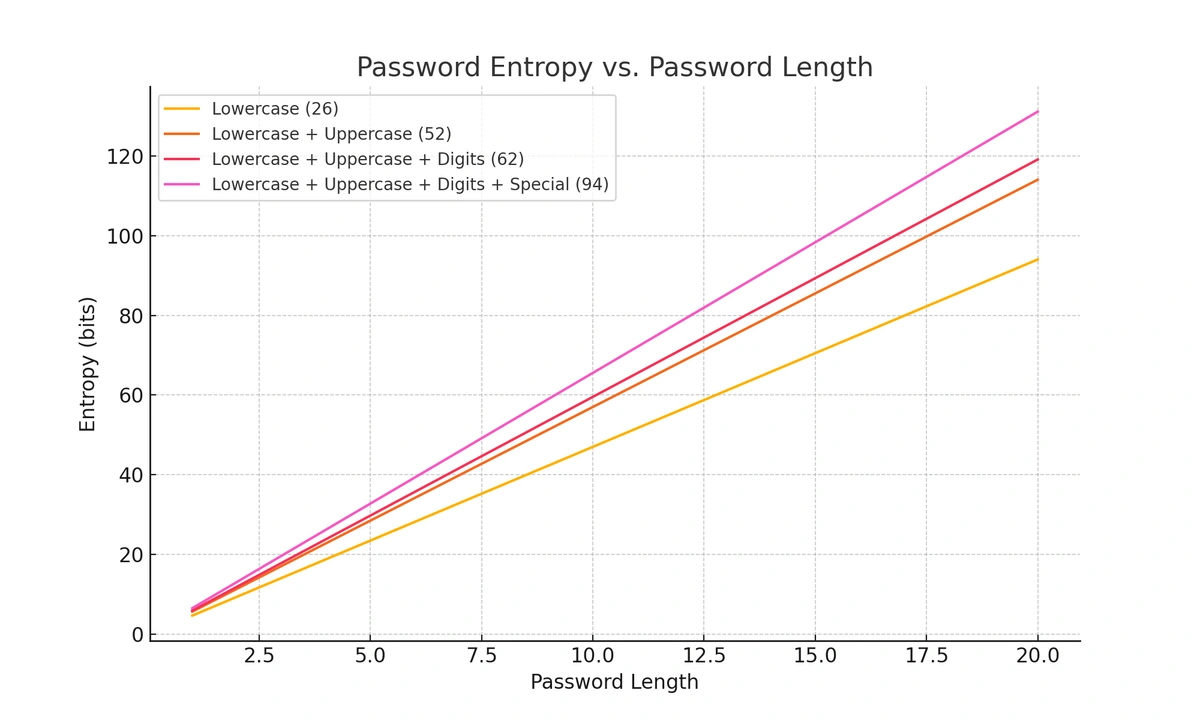
Password length greatly affects strength
Compromised Passwords
A “pwned” password is one that has been exposed in a data breach. When a username and password combination is leaked online, hackers add those credentials to their databases. Because password reuse is so common, pwned passwords almost always appear in corporate password audits. You can check if your credentials have been compromised using tools like Have I Been Pwned.
Identical Passwords
Reusing passwords across multiple accounts can have catastrophic consequences. Once a hacker obtains one password, they can use it to try and access other accounts tied to the same user. This practice, called credential stuffing, is highly effective. Therefore, it is critical to ensure that each password is unique across all accounts.
Outdated Expiration Policies
Depending on old security protocols, some networks still force passwords to expire every 30 to 90 days. A good audit will highlight these policies. Because NIST guidelines now recommend against forced password rotation—as it encourages users to create weaker, predictable passwords—you should use the audit to identify breached passwords for immediate reset, and consider dropping arbitrary expiration dates entirely.
TeamPassword: Secure Sharing for the Modern Workforce
Whatever issues are found during your password audit, the best thing you can do to prevent further vulnerabilities is to equip your users with a dedicated password manager. TeamPassword is the best way to make your team proactive participants in network security.
As part of a modern security strategy, you might also be exploring passkey technology. While passkeys are great for personal use because they eliminate the password entirely, they are not a perfect solution for teams. In a collaborative business environment, administrators need the ability to easily provision, share, and revoke access to shared company accounts. Tying a login strictly to one employee's physical device hardware makes team access control incredibly difficult.
This is why a robust password manager remains essential. Your password manager should have secure sharing and fluid organization so that you can adhere to the principle of least privilege (PoLP). TeamPassword offers unlimited groups, AES 256-bit vault encryption, and two-factor authentication so you have complete peace of mind.
Before anyone can access a list of shared company passwords, they must log in to the platform using their personal credentials and a multi-factor authentication code. Teams often need to share access to mutual accounts, but you don't have to put your data at risk to make this possible.
Use TeamPassword to securely generate, store, and share passwords within your team.
Sign up for a 14-day free trial to test TeamPassword with your team members today.
추천 기사
The 5 Best Enterprise Password Vaults (2026 Comparison)
Standard password tools fail at enterprise scale. Learn how to choose a password manager for security, compliance (SOC ...
3 Best Password Managers for Android (2026)
Here are the best password managers for Android to help you extend your cybersecurity best practices to your ...
What is password encryption and how does it work?
Password encryption is the number one component of password security. TeamPassword encrypts passwords with state-of-the-art technology to keep ...
Cybersecurity for Utilities: Common Threats & Best Practices
The utilities sector is ripe for cyber threats. Learn more about these threats and how to prevent them ...